PreciseFP Now Connects to Claude and ChatGPT

Ask PreciseFP Anything

Connect. Add PreciseFP. Start typing.

Ask about anything from deep business insights to your to-dos, all in plain language.

Beta, open to current PreciseFP customers who request access.

PreciseFP connected
How many accounts and open engagements do I have?
Reading from PreciseFP
You have 1,284 accounts. 37 engagements are in progress, and 9 of those have sat untouched for more than two weeks.
Which nine?
Callahan, Reyes, and Okonjo have been open longest — 31 days each. Want the full list, or should I resend the requests?
Ask anything…How many accounts and open engagements do I have?Which nine?
AI Enabled
In Plain English

What PreciseFP MCP Actually Does

Everything about a client already lives in PreciseFP: the fact finder, the forms, the history. MCP connects that data directly to the AI tool you are already using.

It's your AI, Claude or ChatGPT, working directly with your live PreciseFP data.

Here Is What That Looks Like

Ask. Analyze. Act.

These three examples are samples meant to show the range of what is possible. Actual results depend on each firm's own data and setup.

Watch It in Action

A short walkthrough of the three examples above, running against live data.

How It Works

Get Started in Two Steps

01

First: Request Access

Email support@precisefp.com and ask us to enable PreciseFP MCP for your firm. During the beta, our team handles this step for you.

02

Then: Connect It Yourself

In Claude or ChatGPT, add PreciseFP as a custom connector using the setup guide: paste the URL, sign in, and you are connected.

Connector URLhttps://app.precisefp.com/mcp
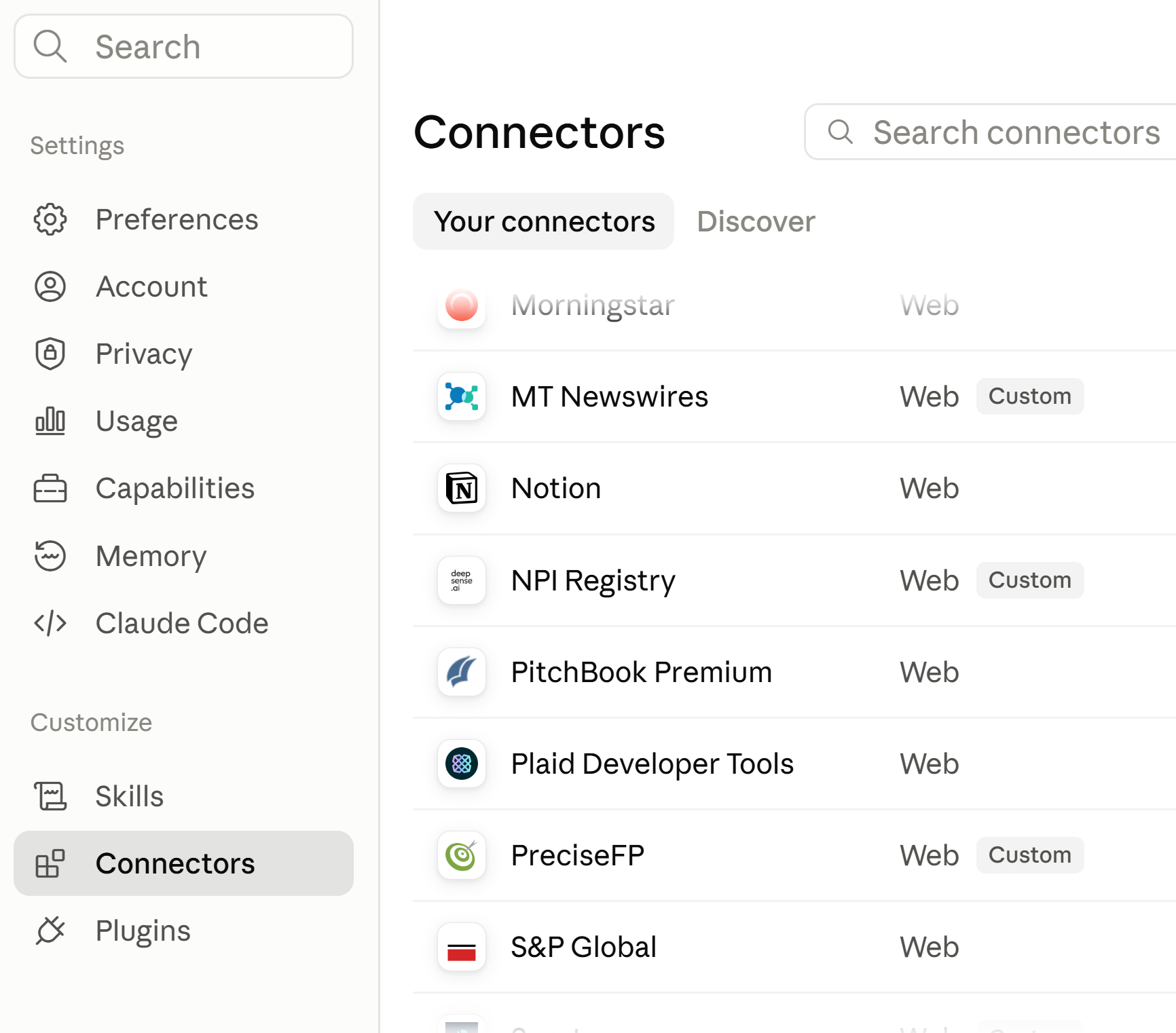
The Connectors settings page in Claude, with PreciseFP listed as a custom connector
Find it in Connectors. PreciseFP appears in your connector list once it is added.
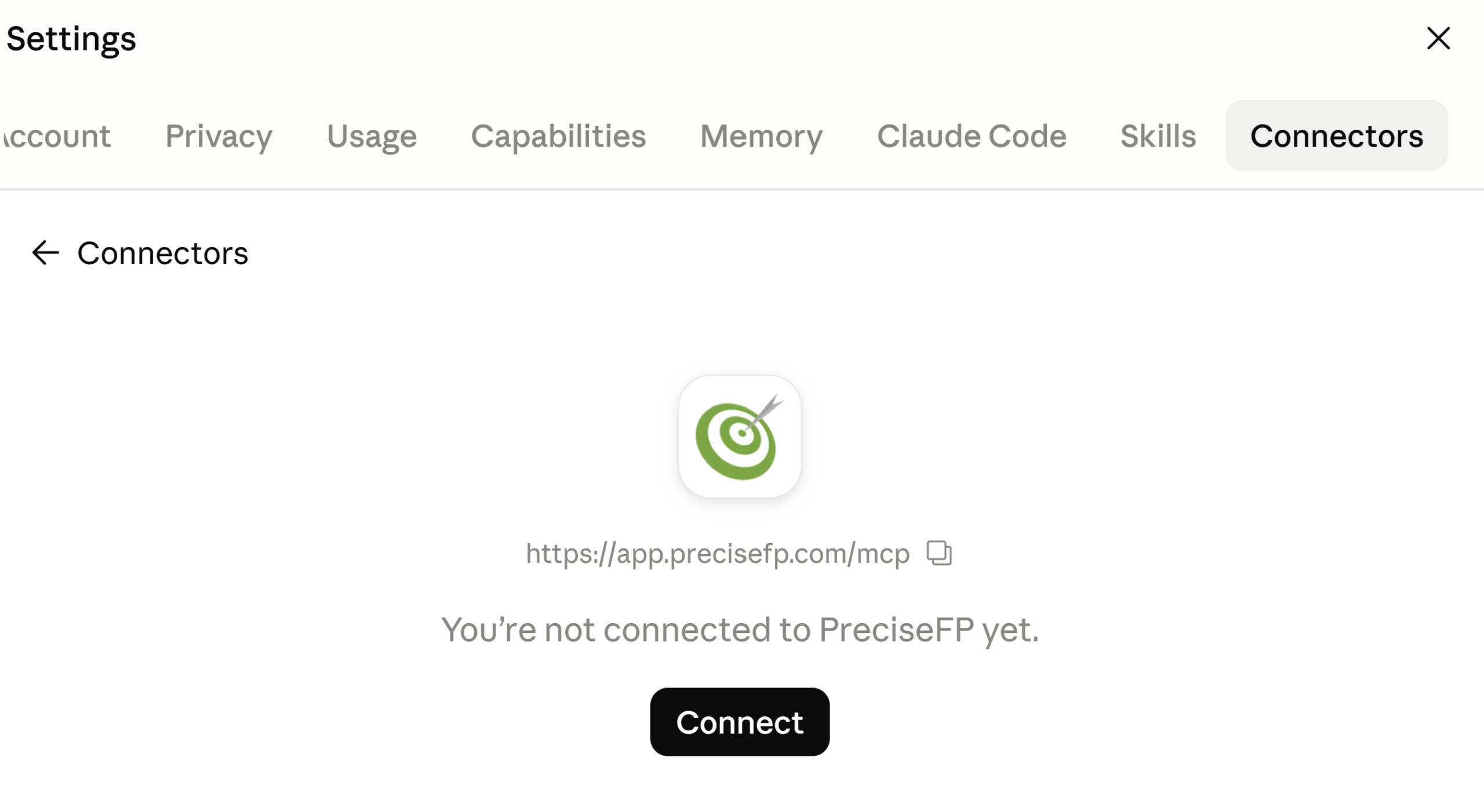
The PreciseFP connector screen showing the server URL and a Connect button
Paste the URL and connect. One button, then sign in with your PreciseFP credentials.
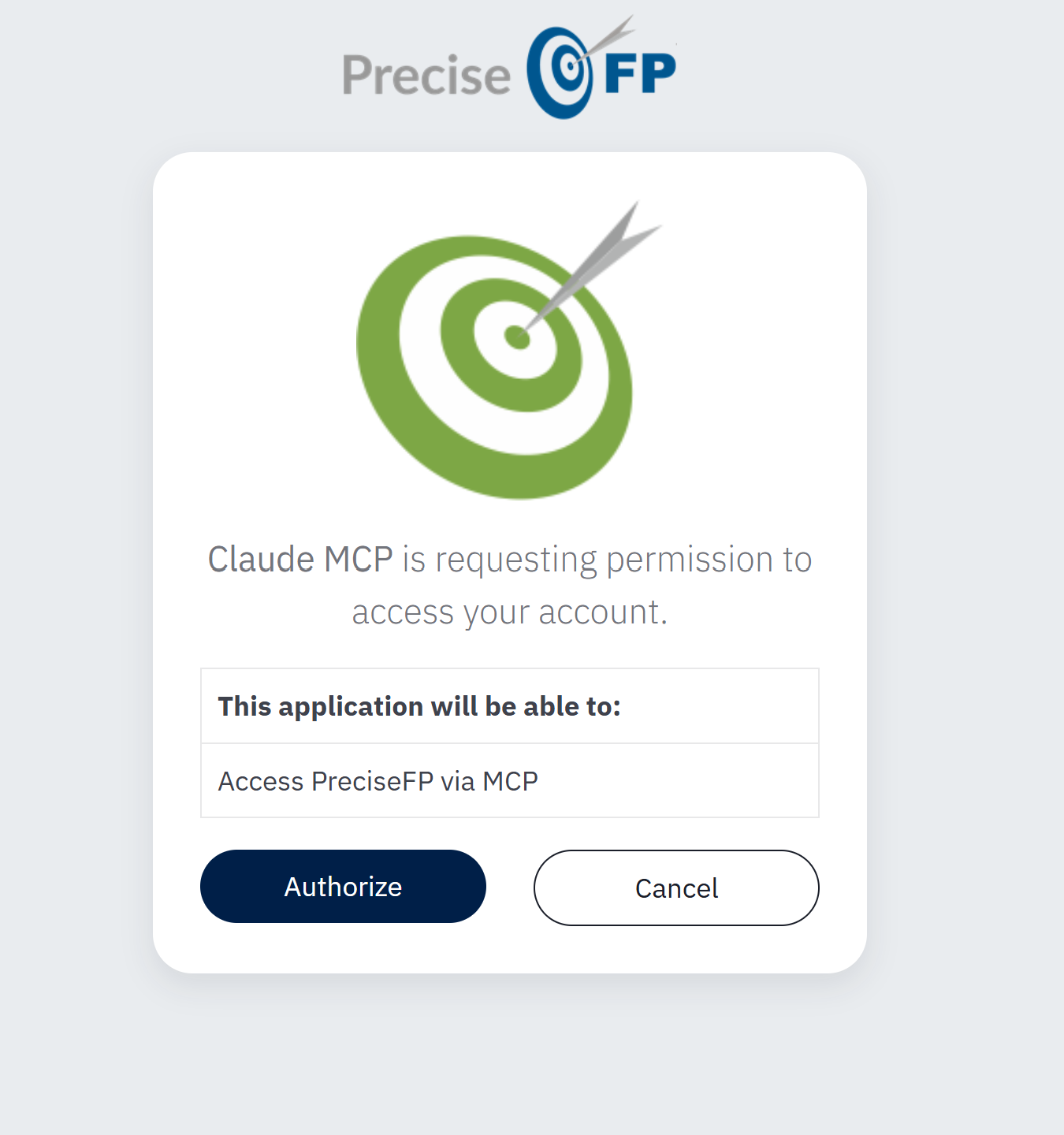
The PreciseFP authorization screen granting the connector access to your account
Authorize it. You approve the access yourself, from your own PreciseFP account.
Ask

Ask It a Question. Get a Straight Answer.

“How many accounts do I have?” pulls back the real number, right in the chat. “Who am I?” pulls up your own user record, including your contact info and team. It looks everything up live in PreciseFP and answers in plain language.

Search, look up, and get answers about your accounts and activity, conversationally, in Claude or ChatGPT.

Who am I?
Reading from PreciseFP
You are signed in as Dana Whitfield, Lead Advisor at Northbank Wealth. Your team has 6 users, and you own 214 of the firm's accounts.
Anything come in from the Callahan household this week?
Yes. Their annual review fact finder was submitted Tuesday. Two fields are still blank: employer and contingent beneficiary.
Analyze

Turn Your Book of Business Into a Straight Answer

“What is the average net worth across my accounts?” “What percentage of my clients have a mortgage?” “Which engagements are in progress, and how complete is the data on them?” Each one comes back as a straight answer, pulled from your live PreciseFP data.

What is already sitting in PreciseFP becomes something you can query.

What is the average net worth across my accounts, and how many clients carry a mortgage?
Across 1,284 accounts
$1.84M
Average net worth
61%
Carry a mortgage
37
Engagements in progress

Sample figures shown for illustration.

Act

Add 50 New Households From One Spreadsheet

Hand it a spreadsheet of new households — first name, last name, email, whatever you have — and ask it to create the accounts. It batches the work, about 25 at a time, and tells you exactly what landed and what did not.

From there, ask it to send an existing engagement, like a Risk Tolerance questionnaire, to that same group. It will ask which template first, since sending one collects real information from the client, and it checks with you before anything goes out.

Create, update, and send from one instruction instead of working record by record.

A sample walkthrough meant to show the range of what is possible. Results depend on each firm's own data and setup.

new-households-Q4.xlsx
Create accounts for everyone in this file.
Writing to PreciseFP · batch 2 of 2
Accounts created48
Skipped, duplicate email2
Errors0
Send them the Risk Tolerance questionnaire.
You have three Risk Tolerance templates. Which one should go out — and do you want me to send to all 48?
Live Walkthrough

Ask, Analyze, Act: A Live Walkthrough of PreciseFP MCP

Thursday, October 8, 2026 · 12:00 PM CST

We will show real examples using live accounts: asking a question and getting a straight answer, analyzing your book of business for things like average net worth or stalled engagements, and handing it a spreadsheet to create accounts and send engagements in bulk. Plenty of time at the end for your questions.

Open to all current PreciseFP customers, whether or not you have requested beta access.
If you want it turned on for your firm, email support@precisefp.com.

Nora Gallegos
Nora Gallegos
Financial Planning Thought Leader
Grab a Seat

Register to attend live or get the recording.

FAQ

Questions You Probably Have

New to Claude or ChatGPT?+
That is fine, most people start here. Claude and ChatGPT are AI assistants you talk to the way you would text a colleague: you type a question, and it answers back in plain language. Both have a free way to try them, and once you have an account, connecting PreciseFP takes about five minutes using our setup guide.
What is MCP, really?+
It is the connection that lets an AI assistant like Claude look things up in another system, in this case PreciseFP, instead of you copying information over by hand. You ask a question in plain language, and it fetches only what is relevant and answers back.
Is my client data safe?+
The connector can only see and do what your own PreciseFP login already permits. That is the limit. It can look things up, and it can create, update, and send, always on your instruction and only when you ask. Client data accessed this way stays fully out of model training, whether that is Claude, ChatGPT, or any other model.
Do I have to set anything up myself?+
Very little. Your firm's access is turned on by PreciseFP after you request it, handled entirely on our side. From there, you add the connector yourself in Claude or ChatGPT using our setup guide. That is the one step on you, and it takes about five minutes.
Why request access instead of just turning it on?+
We are keeping the beta limited to current PreciseFP customers who request it while we work through the rest of the rollout. Email support@precisefp.com and we will enable it for your firm. After that, connecting it is entirely up to you.
Can I disconnect it later?+
Yes, any time, from the same settings where you added it. PreciseFP itself stays exactly the same either way, with your fact finders, forms, and notes right where they are.
Does this only work with Claude?+
It works with Claude or ChatGPT, whichever you already use. It is your AI, connected directly to your PreciseFP data.
Why use Claude or ChatGPT instead of a built-in AI assistant?+
Because it is the same AI you already trust and use for everything else, connected here to your PreciseFP data too. If your firm already asks Claude or ChatGPT questions about anything, that same conversation can now answer questions about your clients, right where you already are.
Can it add or invite teammates to PreciseFP?+
Team and user management stays inside PreciseFP itself. The connector works with your accounts, forms, engagements, and activity. Each person on your team connects their own account individually, the same way you did.
What is different about the beta versus the final version?+
During the beta, it is added as a custom connector rather than something you will find listed in Claude's or ChatGPT's public directory. That listing is still being finalized. We are using feedback from this period to shape what ships at general availability.
Who do I contact with feedback or issues?+
Use the “Beta feedback” link inside Connected Apps once it is turned on, or reach the PreciseFP team at support@precisefp.com.

Ready to Try It?

Email support@precisefp.com to request access. Once it's on, connect it yourself in Claude or ChatGPT.

Request Access